

|
Edit Action (No Action) Location: Action List Context Menu -> Edit Action |
Top Previous Next Contents Index |
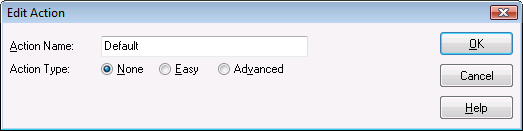
Use this window to change the commands performed when a contact assigned to this action calls.
Action Name |
The name you will use when referring to this action in other parts of the program |
||
Action Type |
Determines what happens when this action is invoked: |
||
|
No action is performed |
||
|
The specified easy actions are performed |
||
The advanced script is run |
|||
|
|
||
|
In the case displayed above Action Type is set to None so no other options are available. |
||
|
|
||
Ok |
Saves any changes and closes the window |
||
Cancel |
Closes the window without saving any changes |
||
Help |
Brings up this topic in Help |
| Send comments or questions about web site to webmaster@ascendis.com |
Modified January 17, 2024, 3:46 pm
|