

|
Edit Call Location: Call List Context Menu -> Edit Call |
Top Previous Next Contents Index |
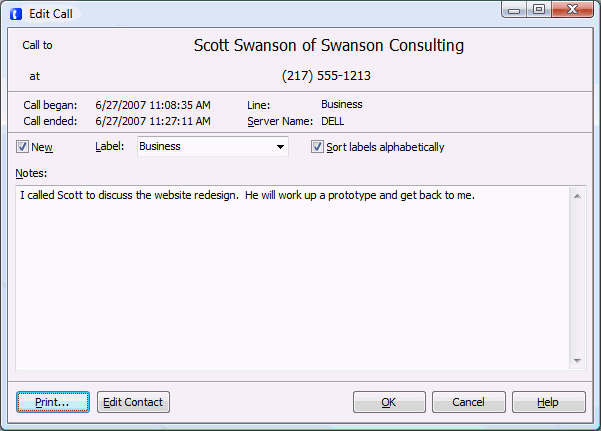
Use this window to view information about a single call, and edit the notes.
New |
This box is checked when the call is considered "new". Uncheck it to mark the call as not-new. |
Label |
The label assigned to the call. Click and select to change the label.
To permanently remove items from the label list, select the item to delete, then press the delete key while the combo box is dropped down (i.e., press delete while the list of labels is displayed). Labels will not be permanently deleted until you click OK to close the window. |
Sort labels alphabetically |
When checked, labels will be sorted alphabetically before display in the "Label" drop-down. Note that once sorted the labels will retain their order even if "Sort labels alphabetically" is unchecked. In that case, however, new labels will be added to the end of the label list regardless of sort order. |
|
|
Opens a printer selection window and prints the call. |
|
Edit Contact |
Only appears if the caller exists in the Contact List. It opens the Edit Contact window for the contact. |
Add Contact |
Only appears if the caller does not already exist in the Contact List. It adds the caller as a new contact and opens the Edit Contact window. |
|
|
OK |
Saves all changes to the call and closes the window. |
Cancel |
Discards all changes to the call and closes the window. |
Help |
Brings up this topic. |
| Send comments or questions about web site to webmaster@ascendis.com |
Modified January 17, 2024, 3:44 pm
|