

|
Action List Context Menu Location: Main Window -> Action List -> Context Menu |
Top Contents Index |
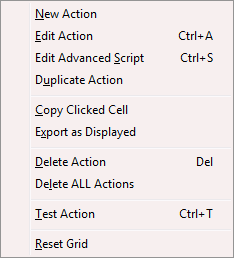
This menu shows the commands available for an action.
New Action |
Adds an action to the Action list. The Edit Action window will be opened so you can set the name, action type, and commands performed. |
Edit Action |
Opens the Edit Action window for the selected action. |
Edit Advanced Script |
Opens the Script Editor with the advanced script for the selected action. This command is disabled if the action is not an advanced action. |
Duplicate Action |
Makes a copy of the selected action. |
|
|
Copy Clicked Cell |
Copies the contents of the grid cell that was clicked to the clipboard. |
Export as Displayed |
Exports the action list with only the fields currently displayed. |
|
|
Delete Action |
Deletes the selected action. You will be prompted for confirmation first unless confirmations are disabled in the Options window. |
Delete ALL Actions |
Deletes all the actions in the Action list. You will be prompted for confirmation first. All your actions will be permanently deleted. Please use this with caution as we cannot restore your actions once they are deleted! |
|
|
Test Action |
Performs the selected action. Note that when a call comes in the action will occur only if a contact with the specified action calls or the caller is not known and the action is specified as New incoming caller action in Advanced Options. |
|
|
Reset Grid |
Resets the columns in the grid to the state when Ascendis Caller ID was first installed. This includes the columns displayed, their positions, and widths. This is not undoable, and no warning is provided. |
| Send comments or questions about web site to webmaster@ascendis.com |
Modified January 17, 2024, 3:44 pm
|