

|
Options (Device, Modems and TAPI) |
Top Previous Next Contents Index |
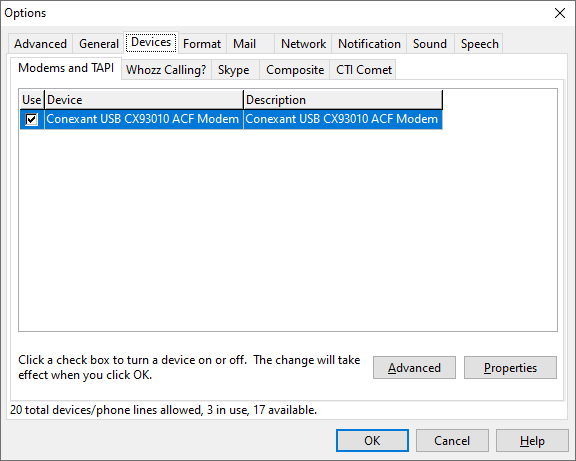
The Modems and TAPI sub page of the Devices page of the Options window specifies which modems and other TAPI devices Ascendis Caller ID will use. You can enable and disable individual devices and change their descriptions.
When first run, and when new devices are added, Ascendis Caller ID tries to enable devices appropriately. In trial mode, this means enabling any device that looks like it could monitor a phone line.
Enabling and Disabling Devices
Each of the devices in the list can be enabled or disabled. When running the trial version of Ascendis Caller ID, up to 20 devices/phone lines can be enabled. When licensed, the license purchased determines the number of devices/phone lines allowed.
To enable or disable a device, click in the "Use" column next to the desired device.
Advanced Device Properties
A few settings that apply to all devices can be changed by clicking the Advanced button. Most users will not need to change these settings.
Device Properties
To change the Description or other characteristics of a device, select the device and click the Properties button.
Number of Devices/Phone Lines Supported
The text near the lower left corner of the window shows the total number of devices/phone lines supported, the number in use, and the number remaining. Ascendis Caller ID is licensed by the number of devices/phone lines used. If you purchased a single phone line license, only one device or phone line is allowed. If you purchased a two line license, two devices or phone lines are allowed.
The term "devices/phone lines" is used since some devices (like modems) only support a single phone line, while others (like Whozz Calling? devices) support multiple phone lines.
In trial mode you can enable up to 20 devices/phone lines. Once the trial is over Ascendis Caller ID will no longer report the caller information for any devices. Once Ascendis Caller ID is purchased and licensed, you will be allowed as many devices/phone lines as purchased. If you try to enable more devices than allowed, Ascendis Caller ID will warn you.
Note to Users of Previous Versions of Ascendis Caller ID
Ascendis Caller ID 1.7.1.0 and earlier listed many irrelevant TAPI devices that are defined by Windows. If you need to access one of these devices, hold down the CONTROL and SHIFT keys while opening the Options window.
Versions of Ascendis Caller ID before 1.5.0.0 used a check mark to indicate that a device was to be ignored. Later versions (as described above) use a check mark to indicate a device is to be used. The labels on the respective pages should make it clear which is which, and the program correctly interprets old settings.
The OK button saves any changes you made to the settings and closes the window. The Cancel button closes the window without saving changes. The Help button brings up this topic in the help file.
| Send comments or questions about web site to webmaster@ascendis.com |
Modified January 17, 2024, 3:45 pm
|