

|
Device Properties |
Top Previous Next Contents Index |
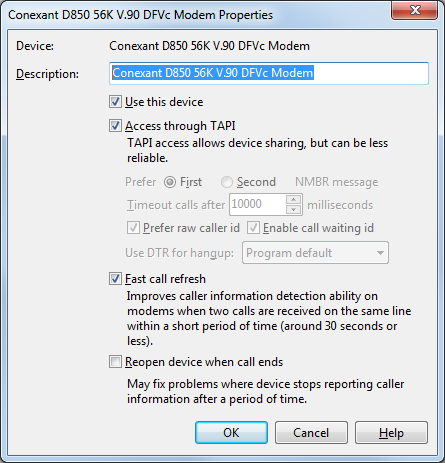
Use the Device Properties window to change characteristics of the selected device.
Description |
This is displayed in various locations (such as the Call list and notification popup) when 'Show "Line" column in Call list' is enabled on the General Options page. If you have multiple phone lines this can be useful for distinguishing between them. You can change the description to anything you want, such as the phone number of the monitored phone line, or perhaps "Home" for one and "Business" for another. |
|
|
Use this device |
Determines whether Ascendis Caller ID attempts to open the device for monitoring caller information. If you have multiple modems or other TAPI devices connected to the same phone line, you would generally only enable one of them. |
|
|
Access through TAPI |
Determines whether Ascendis Caller ID opens the device using TAPI or by communicating with it directly through a serial port. Accessing through TAPI lets other programs share the device, while accessing it directly through a serial port avoids TAPI configuration issues. |
|
Access through TAPI should be checked if: |
|
1) Ascendis Caller ID properly reports the caller information when it is checked OR |
|
2) You also use your modem for dialing into your internet service provider or for sending or receiving faxes, etc. OR |
|
3) You are not using a modem, but rather another kind of TAPI device |
|
Access through TAPI should not be checked if: |
|
1) Ascendis Caller ID does not properly report the caller information when it is checked AND |
|
2) You do not also use your modem for dialing into your internet service provider or for sending or receiving faxes, etc. AND |
|
3) You are using a dial-up modem for accessing caller information |
Prefer First/Second NMBR message |
This setting is only enabled (and relevant) when not accessing the device through TAPI.
Modems usually report the caller's phone number with a "NMBR" message. Some modems incorrectly report two "NMBR" messages in some cases. This setting determines which "NMBR" message will be used for determining the caller's phone number. |
Timeout calls after n milliseconds |
This setting is only enabled (and relevant) when not accessing through TAPI.
Note: 1000 milliseconds = 1 second
Modems generally do not indicate when a phone call has ended. This setting specifies the length of time after which Ascendis Caller ID will assume the call has ended. If this is too low, subsequent rings might be interpreted as a new phone call. This should generally not need to be higher than 30,000 (30 seconds). |
Prefer raw caller id |
This setting is only enabled (and relevant) when not accessing through TAPI.
Normally modems decode the caller id data from the phone company and report it in one to four text messages. Some modems have trouble with some caller id data from some phone companies and report it incorrectly, and some report it in a manner inconsistent with the modem configuration, preventing TAPI from interpreting it. In these cases you should enable Prefer raw caller id so Ascendis Caller ID will decode the raw caller id messages itself.
This will not work with all modems. Some modems will ignore this setting, and some will report the raw caller id in binary, which Ascendis Caller ID does not currently support.
When it works, this may improve the response time for new calls, since Ascendis Caller ID knows only one raw caller id message will be returned. |
Enable call waiting id |
This setting is only enabled (and relevant) when not accessing through TAPI.
When enabled and supported by your modem, the program will report incoming calls while the phone line is in use by a phone that supports call waiting id.
Call modification commands like Hangup and PhoneSound will not work when a call waiting call has been received since the program doesn't know which call is active.
Note: Call waiting id support, as implemented in this program and the Zoom 3095, is called "Snooping CID" in the Zoom documentation. It only works when another phone device that supports call waiting id is connected in parallel with the modem. In our tests, it works if the phone in use ("off-hook") supports call waiting id, but not if a non-call waiting id phone is being used. It is apparently not sufficient for a call waiting id phone to be plugged into the phone line -- it must also be in use ("off-hook"). |
Use DTR for hangup |
Normally this should be set to "Program default" so Ascendis Caller ID can decide whether to use DTR for hangup. However, if you're not using a Zoom 3049C or Zoom 3095 modem and actions using the Hangup command (such as "Block") are not hanging up correctly, you can try setting this to "Yes". (Before doing so, check the "Off Hook Time" setting as described below.)
When Hangup doesn't work correctly, the phone will not be hung up, and may keep ringing. Ascendis Caller ID may think a "No Caller Information" call has been detected right after the failed hangup.
Before changing this to "Yes", make sure the "Off Hook Time" setting in the "Advanced Device Properties" window is set to 2000 or greater. Different phone systems may need different amounts of time to hang up the phone. If the "Off Hook Time" setting is too small, changing "Use DTR for hangup" is unlikely to fix the problem.
Set this to "No" if your modem seems to get stuck off-hook. If this happens, change the setting to "No", then click OK to save the change. Also click OK in the Options window that led to the Device Properties window. Then shut down Ascendis Caller ID using "Exit" on the "File" menu. Next, turn your modem off and on again. (If your modem is a USB-powered model, unplug it from the computer for 5 or more seconds, then plug it back in again.) Now start Ascendis Caller ID and test. |
|
|
Fast call refresh |
Determines how Ascendis Caller ID interprets multiple caller information messages from modems. Sometimes TAPI reports caller information twice for the same phone call, and modems don't report the end of a phone call. When Fast Call Refresh is enabled, Ascendis Caller ID uses special logic to determine whether two caller id messages are for the same call or two calls in succession. Normally this should be enabled, but if you see calls appearing twice, try disabling it. |
|
|
Reopen device when call ends |
When enabled, tells Ascendis Caller ID to close the device and reopen it between calls. This alleviates problems with some devices that can get stuck in an unresponsive state after a call. Normally this is disabled as it could take a second or more to close and reopen the device, during which time Ascendis Caller ID could miss an incoming call. If your modem seems to completely stop responding to calls after a period of time, enabling this may improve the situation. |
The OK button saves any changes you made to the properties and closes the window. The Cancel button closes the window without saving changes. The Help button brings up this topic in the help file.
| Send comments or questions about web site to webmaster@ascendis.com |
Modified January 17, 2024, 3:45 pm
|