

|
Options (Mail) Location: View Menu -> Options |
Top Previous Next Contents Index |
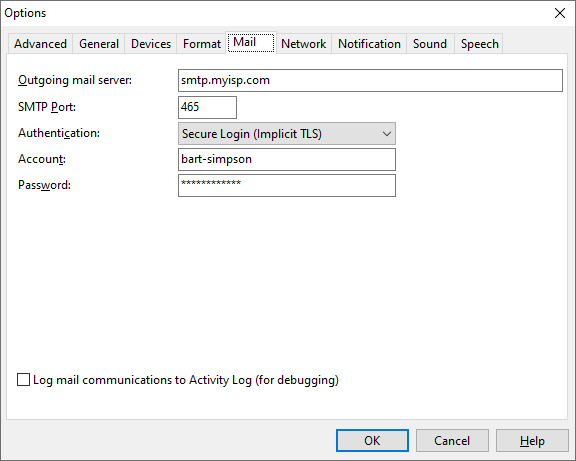
The Mail page of the Options window lets you change the settings Caller ID uses for sending mail. These settings are used for the sendmail command, which is available from Easy Actions and Advanced Actions.
The settings are:
Outgoing mail server (SMTP) |
Specifies the mail server to use when sending an email message from a script. If this is not specified, the sendmail script command will not work. |
SMTP Port |
Specifies the network port number on which the mail server accepts connections. 25 is the default (and usual) value for non-secure authentication. Secure authentication usually uses port 465 or 587. Check with your mail service provider if you don't know which port is used. |
Authentication |
Specifies the type of authentication used by the mail server. If your server requires secure authentication, you may have to experiment with the three options to see which works. |
Account |
Specifies the username for the mail server. (This will not be available if Authentication is set to "None".) |
Password |
Specifies the password for the mail server. (This will not be available if Authentication is set to "None".) |
POP3 Port |
This is only available when Authentication is set to "POP3 Login". 110 is the default (and usual) setting. |
Log mail communications to Activity Log (for debugging) |
When checked, Ascendis Caller ID logs communications with the mail server to the Activity Log. This is useful for debugging problems sending mail. |
Note for AOL users: try using "smtp.aol.com" for Outgoing mail server (SMTP), and 587 for Port. For more information about using AOL with standard internet mail programs, see http://about.aol.com/faq/openmailaccess.
The OK button saves any changes you made to the settings and closes the window. The Cancel button closes the window without saving changes. The Help button brings up this topic in the help file.
| Send comments or questions about web site to webmaster@ascendis.com |
Modified January 17, 2024, 3:46 pm
|