

|
Network Options Location: View Menu -> Options |
Top Previous Next Contents Index |
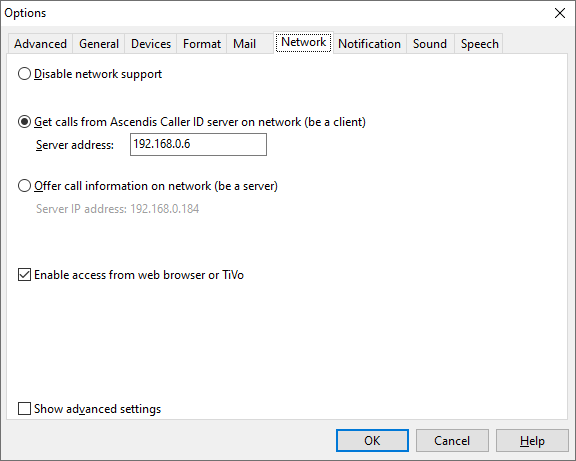
Ascendis Caller ID has built-in network support which enables it to send and receive call information to and from other computers on a network. This is useful if you have multiple computers connected by a network but only one has a caller id-capable modem. The computer with the modem can send the caller id information to the other computers on the network.
Disable network support |
When selected, Ascendis Caller ID will not send or receive call information over the network. Select this if you only have one computer, or you have no desire to send or receive caller information to other computers. Since no information is transferred across the network, this is the most secure option.
This is the default setting. |
||
|
|
||
Get calls from Caller ID Server on network (be a client) |
To share calls over a network, select this for all computers that are not already connected to a caller id-capable modem. These computers will pick up the caller id information from the network. |
||
|
Set this to the IP address of the machine acting as Ascendis Caller ID server. This is usually the computer running Ascendis Caller ID that is connected to the caller-id capable modem or other device. You can determine the server's address by looking at the Network page of the Options window of Ascendis Caller ID running on the server. It appears as "Server IP address" on this page. |
||
|
|
||
Offer Caller ID information on network (be a server) |
Select this for one computer connected to a caller id-capable modem or other device. |
||
|
Indicates the IP address of this machine. If this computer is configured as the server, then enter this value in the Server address field of the clients. |
||
|
|
||
Enable access from web browser or TiVo |
Enable this if you want to access Ascendis Caller ID data from a web browser or a TiVo series 2 with Home Media Option. |
||
|
|
||
Show advanced settings |
When checked, displays advanced network settings. We don't recommend using the advanced settings unless you know why you need them. |
||
|
|
||
OK |
Saves any changes you made to the settings and closes the window. |
||
Cancel |
Closes the window without saving changes. |
||
Help |
Brings up this topic in the help file. |
The Network Status Icon shows the current network connection status.
The Network Status Window can be helpful for users taking advantage of Ascendis Caller ID's network features.
| Send comments or questions about web site to webmaster@ascendis.com |
Modified January 17, 2024, 3:47 pm
|