

|
Activity Log Location: View Menu -> Activity Log |
Top Previous Next Contents Index |
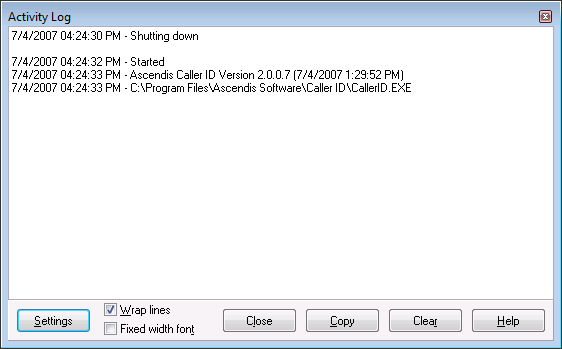
The Activity Log contains significant events that appeared while the program was running. Messages are date and time stamped.
Settings |
Opens the Activity Log Options window. |
Wrap lines |
Determines whether the lines in the log are wrapped to fit the width of the window. If not wrapped, a horizontal scroll bar will appear, when needed, to scroll the rest of the line(s) into view. |
Fixed width font |
Determines whether the log is displayed in a proportional font (not checked) or a fixed width font (checked). |
Close |
Closes the Activity Log window. |
Copy |
Copies the selected parts, or the entire log, to the clipboard. |
Clear |
Clears the log. |
Help |
Brings up this help window. |

Press Ctrl+F to bring up the Find panel. Type the text to find in the edit box and press ENTER to find the next occurrence. Check "Case sensitive" to perform a case-sensitive search. Press the "X" button to close the panel. Press F3 to find the next occurrence and display the Find panel if not already visible.
The log is not cleared automatically, and will grow as needed, subject to the settings in Activity Log Options. It is stored in the file "Log.txt" in the Ascendis Caller ID data folder (normally "C:\Users\All Users" in Windows Vista, and "C:\Documents and Settings\All Users\Application Data\Ascendis Software\Ascendis Caller ID" under Windows XP), which is usually hidden.
This window can be viewed by using the "Activity Log" item on the View menu, or by clicking the Activity Log button ( ) on the main toolbar.
| Send comments or questions about web site to webmaster@ascendis.com |
Modified January 17, 2024, 3:44 pm
|