

|
Options (Sound) Location: View Menu -> Options |
Top Previous Next Contents Index |
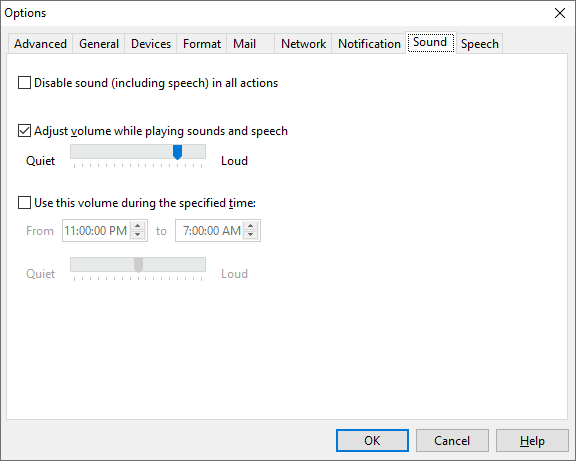
The Sound page of the Options window contains the following settings:
Disable sound (including speech) in all actions |
Turns off sound for all Ascendis Caller ID actions. Actions that play a sound or speak will do nothing when this is checked. This applies to use of the 'Test Action' command as well as when Ascendis Caller ID is processing an incoming call. When checked, the volume adjusting controls are disabled, since the volume will not be changed when this is enabled. The 'Play' button on the Speech page will work regardless of this setting. |
||
Adjust volume while playing sounds and speech |
Specifies a specific volume setting for Ascendis Caller ID. When checked, Ascendis Caller ID will change the master volume to the volume you specify here before playing a sound or speech, and change it back when the sound or speech is finished. This lets you set a normal volume using the system volume control and still hear Ascendis Caller ID from another room when a call comes in. |
||
Use this volume during the specified time |
Specifies a specific volume setting for Ascendis Caller ID that is only in effect during the configured time. When checked, Ascendis Caller ID will change the master volume to the volume you specify here before playing a sound or speech, and change it back when the sound or speech is finished, but only during the configured time. |
||
|
The earliest time each day that the volume will be adjusted as specified by the following volume control. |
||
|
The latest time each day that the volume will be adjusted as specified by the following volume control. |
You can use both volume settings to specify two different volume levels for Ascendis Caller ID. The bottom volume control (if enabled) is active only during the configured times, while the top volume control (if enabled) is active the rest of the time.
The OK button saves any changes you made to the settings and closes the window. The Cancel button closes the window without saving changes. The Help button brings up this topic in the help file.
| Send comments or questions about web site to webmaster@ascendis.com |
Modified January 17, 2024, 3:48 pm
|