

|
Display Panel Context Menu Location: Main Window -> Display Panel -> Context Menu |
Top Contents Index |
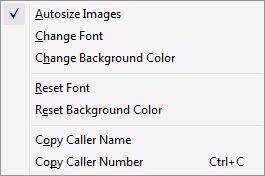
This menu shows the options available for the display panel.
| • | Autosize Images instructs Ascendis Caller ID to resize contact pictures dynamically to fit the display panel. |
| • | Change Font lets you change the font (including the color) of all the text in the display panel. |
| • | Change Background Color lets you change the background color of the entire display panel. |
| • | Reset Font changes the font back to the original font. |
| • | Reset Background Color changes the background color back to the original color. |
| • | Copy Caller Name copies the caller's name to the system clipboard. |
| • | Copy Caller Number copies the caller's phone number to the system clipboard. |
The display panel can be further customized by editing the display file. To edit it, hold down the Control key while bringing up the context menu and select "Edit Display Script". The file is in HTML format with DWS code to supply the appropriate values.
| Send comments or questions about web site to webmaster@ascendis.com |
Modified January 17, 2024, 3:45 pm
|