

|
Edit Contact (Patterns Page) Location: Contact List Context Menu -> Edit Contact |
Top Previous Next Contents Index |
(Click the tabs in the image below to get help on other pages.)
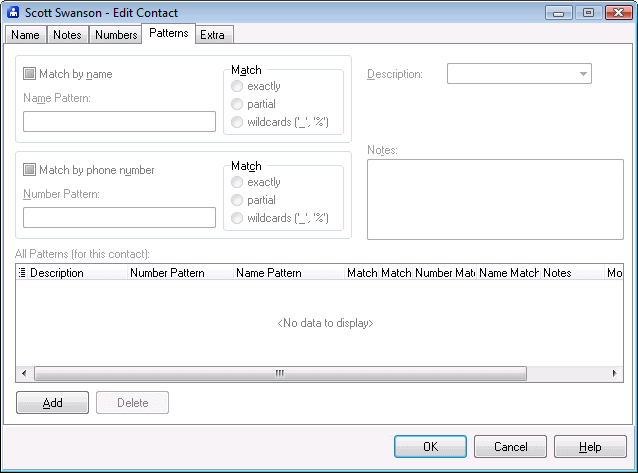
Use the Edit Contact window to change a contact's information. The Patterns page determines the patterns associated with a contact.
Note: Patterns are an advanced feature of Ascendis Caller ID. Most users will not benefit from using them.
Each contact can have zero or more patterns. Patterns let Ascendis Caller ID associate new phone numbers with contacts without adding each individual phone number. However, it only works when the phone number or caller id name is unique to the contact.
Match by name |
Indicates that the pattern should perform name matching. The pattern specified in Name Pattern will be matched against the raw caller id name for phone numbers that do not already have a contact assigned. |
||
Name Pattern |
The pattern to use when matching by name. It consists of either the complete or partial expected raw caller id name, with or without wildcards. (See "wildcards", below for an explanation of wildcards.) Examples include: CCA DATABASE NOT PROVIDED %SURVEY% |
||
|
|
||
Match |
Determines the type of matching to perform: |
||
|
Matches the Name Pattern exactly as it appears. Note that case is ignored. |
||
|
Matches the Name Pattern if it appears anywhere in the raw caller id name. Note that case is ignored. |
||
|
Matches the Name Pattern as it appears, while interpreting underscores ("_") as any character, and percent signs ("%") as any number of characters. Note that case is ignored. |
||
|
|
||
Match by number |
Indicates that the pattern should perform number matching. The pattern specified in Number Pattern will be matched against the raw caller id number for phone numbers that do not already have a contact assigned. |
||
Number Pattern |
The pattern to use when matching by number. It consists of either the complete or partial expected raw caller id number, with or without wildcards. (See "wildcards", below for an explanation of wildcards.) Examples include: 800555772_ 80055577__ 8005557% OUT OF AREA |
||
|
|
||
Match |
Determines the type of matching to perform: |
||
|
Matches the Number Pattern exactly as it appears. Note that case is ignored. |
||
|
Matches the Number Pattern if it appears anywhere in the raw caller id number. Note that case is ignored. |
||
|
Matches the Number Pattern as it appears, while interpreting underscores ("_") as any character, and percent signs ("%") as any number of characters. Note that case is ignored. |
||
|
|
||
Description |
The description to assign to phone numbers assigned to the contact using this pattern. |
||
Notes |
Stores textual information about the pattern. |
||
|
|
||
All Patterns (for this contact) |
Lists the patterns for the contact. To view or edit one, click it. |
||
Add |
Adds a new pattern. After clicking Add, fill in the desired pattern fields. |
||
Delete |
Deletes the selected pattern from the contact. If you accidentally delete a pattern, you can cancel all contact changes by pressing the Cancel button. |
||
|
|
||
OK |
Saves all changes to the contact and closes the window. |
||
Cancel |
Discards all changes to the contact and closes the window. |
||
Help |
Brings up this topic. |
Note: As of version 3.0.0.6, when both "Match by name" and "Match by number" are enabled (checked), both name and number must match for the pattern to match and the phone number to be reassigned. In previous versions, the pattern would match if either the name or number matched.
Q: Why would I use a pattern?
A: You probably wouldn't. However, if a company or organization frequently calls you from different phone numbers, but the phone numbers are all similar (such as differing by only one or two digits), or the raw caller id name is always the same (for example, "ACME Widgets"), then you might. If all calls from a company or organization always included the same raw caller id name, this might be very useful. In reality, this is rarely the case.
Please remember that once a phone number is assigned to a contact, any existing or future patterns have no effect on it. Patterns are only used to assign unassigned phone numbers to contacts. In other words, normally a pattern is only used once per phone number. The exception is when a contact is deleted, at which point its phone numbers become unassigned. They can then be reassigned to new contacts using patterns.
| Send comments or questions about web site to webmaster@ascendis.com |
Modified January 17, 2024, 3:45 pm
|