

| Overview | |
|
Ascendis Caller ID can send or receive caller information over a
network. When configured to send caller information over a network,
we call it a server. When configured to receive caller
information over a network, we call it a client. Ascendis
Caller ID can act as a client, server, both or neither. The standard
version of Ascendis Caller ID works for client, server, or standalone
configurations. The ability to share calls over a network makes Ascendis Caller ID ideal for a small or home office. You can monitor calls from multiple computers, or multiple people can monitor calls at the same time. You can even monitor calls over the internet! Ascendis Caller ID is licensed per phone line, so you must purchase an appropriate license for the number of phone lines being monitored. You can run it on as many computers as you like. For ordering options, please see the order page. Configurations |
|
| Single Server with Modems | |
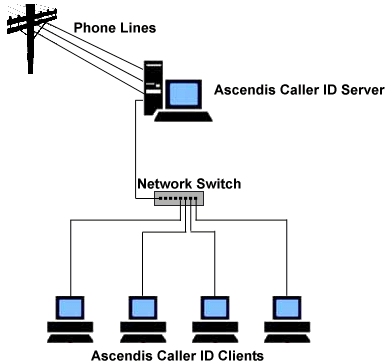 In this configuration all the phone lines run to one computer, which acts as a server to all the Ascendis Caller ID clients. The phone lines are connected to external or internal modems (not pictured). Getting multiple modems to work in one computer can be tricky. We recommend external serial modems, such as the Zoom 3049, or external USB modems with hardware controllers, such as the recommended Zoom 3095. We don't recommend other external USB modems or internal modems since most have software controllers (also known as winmodems or soft modems) and all of these we've tested do not support caller id on all modems when multiples are installed in or connected to the same computer. The number of external serial modems that can be used is limited by the number of serial ports on the computer. Some modern computers have no serial ports. While USB-to-serial adapters can be used, we recommend using Zoom 3095 modems instead if no serial ports are available. This is because USB-to-serial ports add more complexity and aren't uniformly compatible. However, if you already have serial modems compatible with Ascendis Caller ID, USB-to-serial ports are a reasonable solution if you find some that work for system. Not all USB-to-serial ports work for all computers and modems. See our discussion of multiple modems in our forums for potential problems when using multiple internal modems in one computer. Our modem page has information on modems that have been tested with Ascendis Caller ID. Pros:
(View software configuration instructions) |
|
| Single Server with Whozz Calling? Device | |
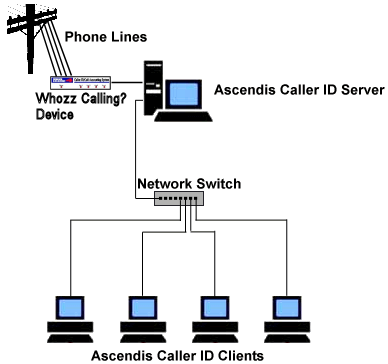 In this configuration all the phone lines run to a Whozz Calling? device which is connected to one computer. This computer acts as a server to all the Ascendis Caller ID clients. Whozz Calling? devices only require a single serial port connection on the computer, or no serial ports if an Ethernet Link model is used. We recommend the Whozz Calling? 2, Whozz Calling? 4, or Whozz Calling? 8 depending on the number of phone lines you need to monitor. You can also use the Whozz Calling? Lite 4 or 8 line units, but they do not support outbound call monitoring. Pros:
(View software configuration instructions) |
|
| Send comments or questions about web site to webmaster@ascendis.com |
Modified October 9, 2020, 9:26 am
|