

|
Contact List Location: Main Window -> Contacts |
Top Previous Next Contents Index |
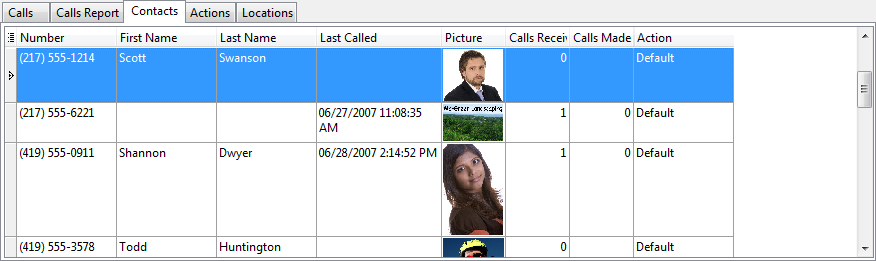
The contact list shows contacts and their phone numbers. Each contact is listed once for each phone number associated with the contact. So, a contact with two phone numbers is shown in the list twice, even though it's a single contact.
Contacts are used to customize the display and actions for specific callers. When a call comes in that matches a caller in the contact list, the action specified for that contact is performed. A match occurs when the raw number on the incoming call and the contact are the same.
We recommend creating contacts for frequent callers and callers you would like tracked by a name you provide instead of the caller id name. In addition, if you would like to keep notes for a specific caller, create a contact. Finally, if you want a specific action for a caller -- one that differs from the new incoming caller action -- you must create a contact for the caller.
We recommend adding contacts by first finding a call from the caller in the call list. Then, right-click on the call and choose "Add to Contacts". Adding contacts this way is guaranteed to have the correct phone number, assuming the correct call was used. To add many contacts at once, use the Import feature.
Some phone calls do not return an actual phone number even though some caller information (such as date and time, perhaps) was received. The "raw number" equivalents for these calls are as follows:
Raw Number |
Meaning |
Blocked |
Caller has blocked caller id information. In other words, this is an anonymous call. Most caller id boxes or phones would display this as "Blocked", "Private", or "Anonymous". There is no way to retrieve to the caller's name or number as it was not sent to your phone. The phone company, presumably, can still trace the call. |
Out of Area |
Caller information for the call is not available since it is not propagated all the way by the phone network. There is no way to retrieve to the caller's name or number as it was not sent to your phone. The phone company, presumably, can still trace the call. |
These special "raw number" values are returned by Ascendis Caller ID. Ascendis Caller ID includes predefined contacts for these. These contact entries are not special, although they define appropriate actions. You can delete these contacts, but we don't recommend it. (Please Export the contact list before doing so.)
If no caller information is received, the phone number and name will be blank. Ascendis Caller ID defines a contact named "No Caller Information" to indicate this. This is a normal contact entry with nothing for the name and number. You can delete this contact, but we don't recommend it. (Please Export the contact list before doing so.)
Double-click a contact to edit it. Contact editing is performed in the Edit Contact window.
The grid can be altered using the common grid controls. In addition, you can type text to auto-scroll to the desired row. Specifically, the grid will auto-scroll to the row where the typed characters match the first column. To search using a different column, drag the column to the first position by clicking and dragging the column header. Press the ESCAPE key to clear the typed characters.
For other options, right-click the contact to display the context menu:
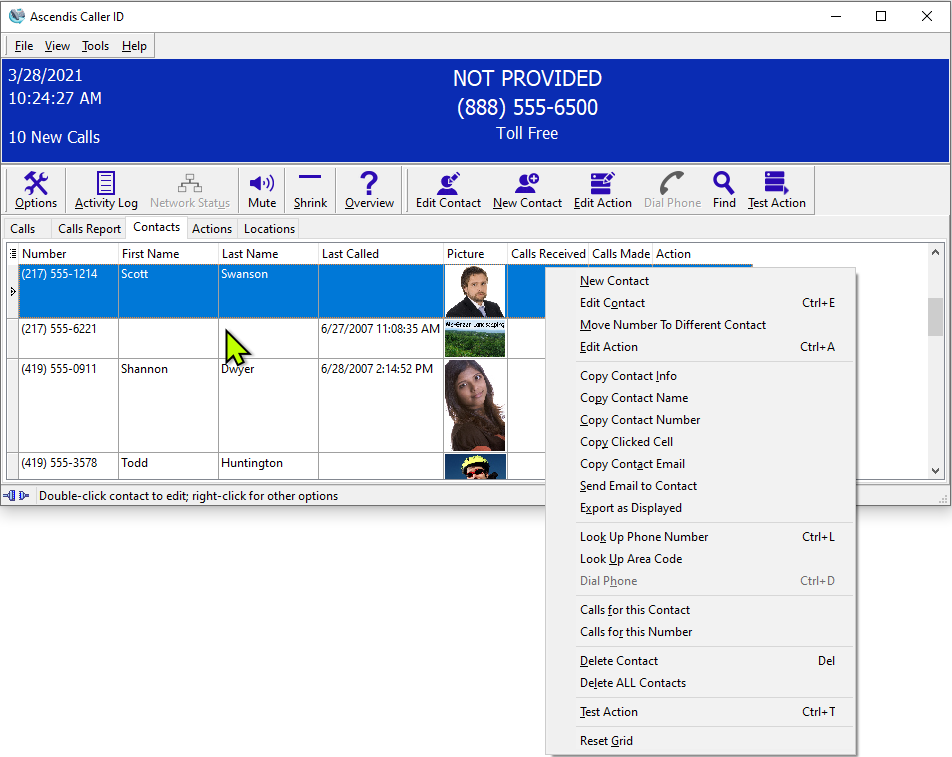
To see the number of contacts in the list, hold the cursor over the tabs. The status bar will show the number of contacts.
You can sort the list by any column by clicking on the column heading. The contact list is sorted by Number when first installed.
You can change the width of a column by holding the cursor over the line at the right side of a column heading, then clicking and dragging the column edge. The column widths are retained between sessions.
| Send comments or questions about web site to webmaster@ascendis.com |
Modified January 17, 2024, 3:45 pm
|